

The .gov means it's official.
Federal government websites often end in .gov or .mil. Before sharing sensitive information, make sure you're on a federal government site.

The site is secure.
The https:// ensures that you are connecting to the official website and that any information you provide is encrypted and transmitted securely.

Creating and Using Collections
Note: This page contains instructions and screenshots so you can see what to expect when using Permits Online, our online method of applying for a TTB permit, registration, or notice.
Collections allow you to create a group of related submissions so that you can view them together in one place. Collections are useful if you are filing applications for multiple companies or if your company has multiple TTB-regulated operations or locations.
General Information about Collections
- A collection is a custom view you create, but the records you add to a collection will remain in your "My Records" list.
- There is no limit to the number of collections you can create.
- Submissions/records may be added to more than one collection.
- You may not add partial records (that is, applications/submissions you have started but have not submitted to TTB) to a collection.
Creating a New Collection
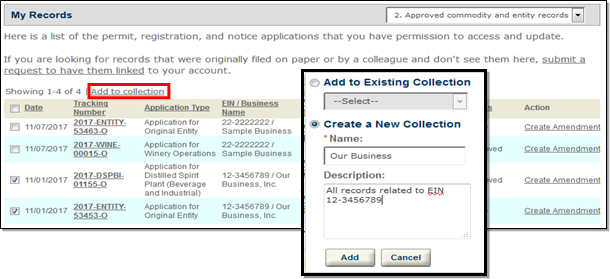
From the "My Submission" page, select the check boxes next to the applications or other records you want to group together, and select "Add to collection."
Name the collection, and add an optional description; then select "Add."
Viewing Your Collections
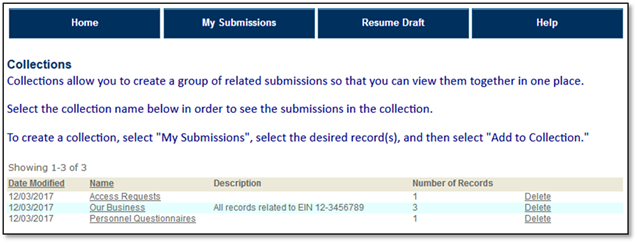
To access a collection select the "My Record Collections" link at the top of the screen.

To view the records in a collection, select the collection from the list.
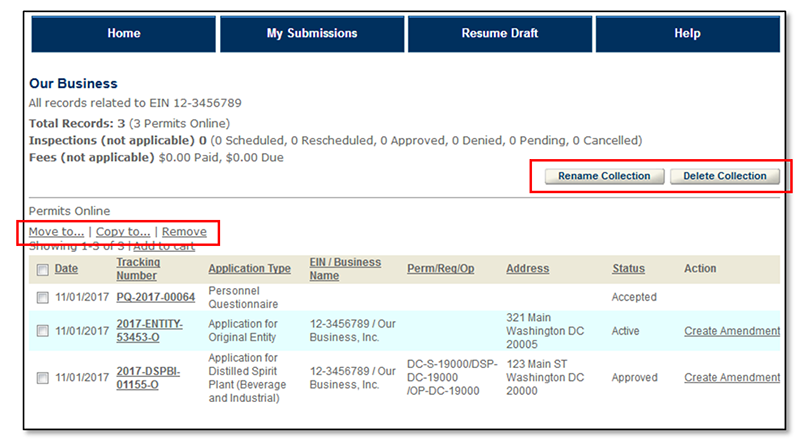
Modifying a Collection
You may modify a collection as follows:
- Add additional records
- Remove records
- Move records to another collection
- Copy records to another collection
- Rename the collection
- Delete the collection
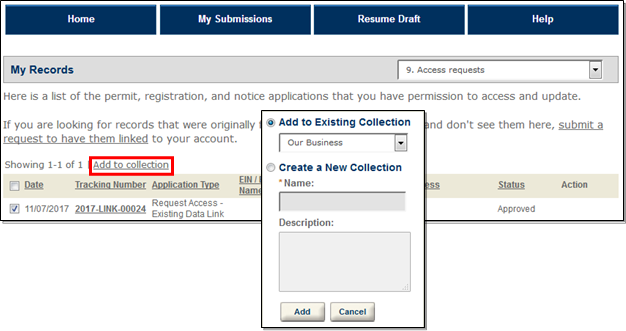
You may add a record to an existing collection from the "My Submissions" page by selecting the check box next to the record and selecting the "Add to collection" link. Select the collection name from the dropdown; select "Add."
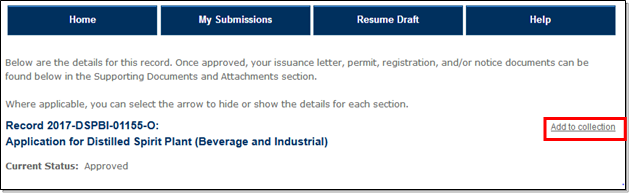
You may also add a record to a collection from the "Records Detail" screen for a particular submission.
The remainder of the options to modify a collection are available when you view the collection.
Go back to the Permits Online Help Center
Last updated: March 17, 2025
Maintained by: National Revenue Center