

The .gov means it's official.
Federal government websites often end in .gov or .mil. Before sharing sensitive information, make sure you're on a federal government site.

The site is secure.
The https:// ensures that you are connecting to the official website and that any information you provide is encrypted and transmitted securely.

How to Retrieve Your Approval Document
Note: This page contains instructions and screenshots so you can see what to expect when using Permits Online, our online method of applying for a TTB permit, registration, or notice.
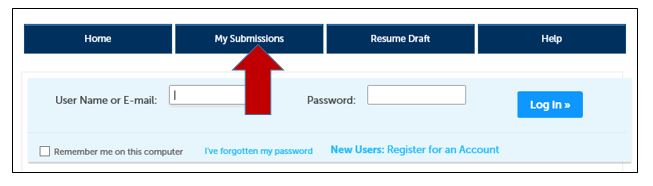
- Log in your Permits Online account
Click the My Submissions button
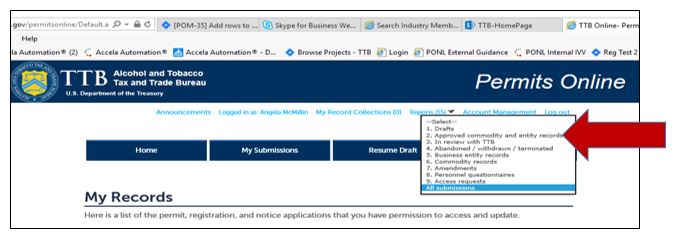
Filter your records by selecting Approved commodity and entity records from the dropdown
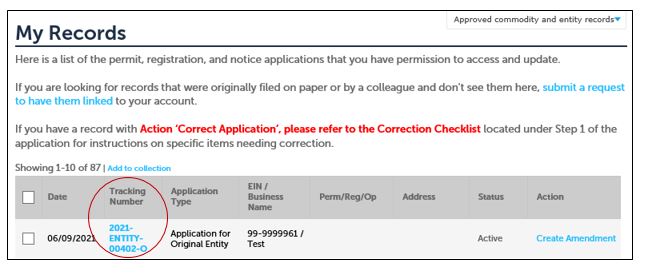
Locate the Tracking Number of the record you need to retrieve approval documents from and click on it
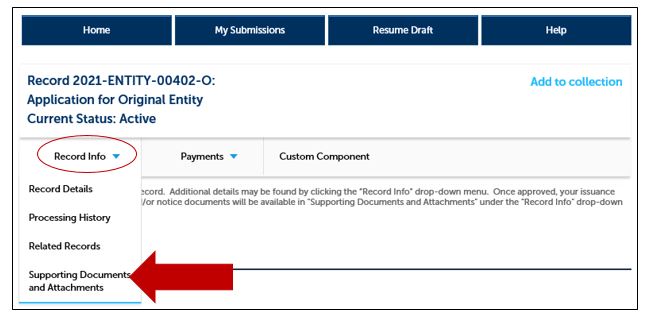
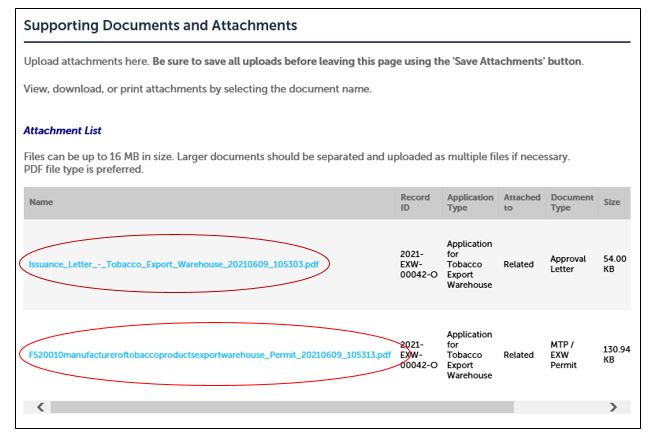
Click the arrow next to Record Info and select Supporting Documents and Attachments from the menu
Select the document from the Attachment List to open and view. You may save the document to your computer or print it if you wish however these documents will always be located here.
Go back to the Permits Online Help Center
Last updated: November 17, 2025
Maintained by: National Revenue Center